A fresh clone on a CI runner fails before a single test runs:
fatal: remote error: upload-pack: not our ref b81f2aa3c47e0d9e1f62a8b5c0d47e19f3a6b2c8
fatal: Fetched in submodule path 'backend', but it did not contain b81f2aa3c47e0d9e1f62a8b5c0d47e19f3a6b2c8. Direct fetching of that commit failed.
Nothing is wrong with the code. Someone pushed the top-level repository while the commit it points to still lived only on their laptop. Their machine works. Every other machine is broken until they push again.
That error is the whole subject of this article in one line. A git submodule is a pointer to one exact commit in another repository. Every rule in the workflow below, including "AI agents never touch Git history", follows from taking that sentence seriously.
The setup is a platform made of a backend repository (an Nx monorepo of thirteen NestJS services), a frontend repository, and a thin top-level repository that ties them together. The system is still a prototype, so what follows is the workflow as it exists in the repository, plus the parts I would tighten, not a story about production.
Why use a meta-repo at all?
The top-level repository, the meta-repo, contains almost no application code. It holds the architecture and API documentation, the sequence diagrams, the Postman collections, the rule files that AI agents read, and exactly two pointers: one to backend, one to frontend.
The backend and the frontend each keep their own repository, their own CI pipeline, their own merge requests and their own pace. The backend is already a monorepo inside, and that article covers why. What the meta-repo adds is one answer to a question that otherwise has no home: which backend goes with which frontend, and which documentation describes that pair?
Here is the analogy I will keep coming back to. A meta-repo is a lockfile for repositories.
package.json says "I need lodash, something in the 4.x range". package-lock.json says "exactly this version, with this integrity hash". You rarely edit the lockfile by hand. Someone bumps it on purpose, and the bump shows up in review. A submodule pointer works the same way, and so do its failure modes.
What is a git submodule, really?
A submodule has two halves, and people usually only notice one of them.
The first half is .gitmodules, a plain text file that says where to fetch from:
[submodule "backend"]
	path = backend
	url = ../backend.git
	branch = main
[submodule "frontend"]
	path = frontend
	url = ../frontend.git
	branch = main
The second half lives in the tree itself. Ask Git what backend is:
git ls-tree HEAD backend frontend160000 commit 9d04e1c... backend
160000 commit 3e7a51b... frontendMode 160000 is a gitlink. It is not a directory and not a file. It is one commit hash. The meta-repo never stores the backend's files; it stores which backend commit it expects.
That is why branch = main is so misleading. It does not mean "follow main". The meta-repo always records an exact commit, the same way a lockfile records an exact version even though package.json says ^4.17.0. The branch line only matters when you explicitly ask for the latest with git submodule update --remote.
It also explains what a "change" to a submodule looks like from the top:
diff --git a/backend b/backend
index 9d04e1c..b81f2aa 160000
--- a/backend
+++ b/backend
@@ -1 +1 @@
-Subproject commit 9d04e1c...
+Subproject commit b81f2aa...
That is the entire diff. Two hashes. Whatever happened between them is invisible unless you go and look.
Why relative URLs in .gitmodules?
The URLs are ../backend.git, not full addresses. Git resolves them against the remote the meta-repo itself was cloned from. A developer cloning over SSH and a CI runner cloning over HTTPS both end up at the right sibling repository with the credentials they already have.
The repositories in this project moved to a new Git group once, and .gitmodules did not change at all. The move did have one sharp edge, and it is the opening error again: the submodule repositories had to be imported before the meta-repo, and each had to contain every commit the meta-repo's gitlinks pin. A pointer is only as good as the commit behind it.
How do you read git submodule status?
git submodule status 9d04e1c... backend (heads/main)
+b81f2aa... frontend (heads/feat/auth/session-ui)The first character carries the information:
- a space: the checked-out commit matches what the meta-repo records;
+: the checked-out commit differs from the recorded one;-: the submodule was never initialized;U: the gitlink has a merge conflict.
A + is not an error. It is a pointer that has moved in your working tree but has not been committed. Remember it; it comes back in the section on agents.
Why does a submodule start in detached HEAD?
Because the meta-repo asked for a commit, not a branch. git submodule update does essentially git checkout <recorded-hash> inside the submodule, and checking out a bare hash leaves you on no branch at all:
git clone --recurse-submodules <meta-repo-url> platform
cd platform/backend
git status
# HEAD detached at 9d04e1c
In lockfile terms, the submodule's working tree is node_modules: an installed copy of exactly what the lock says. You can edit files in node_modules. The next install wipes them.
Here is the version of that wipe that costs people an afternoon. I reproduced it in a scratch repository with submodule.recurse turned on, which this project's clone also has:
cd backend                       # HEAD detached at a299b93
echo fix > z && git add z
git commit -m "fix the thing"    # creates ddb55ad, on no branch
cd ..
git pull                         # the top level pulls, then updates submodules
cd backend && git status
# HEAD detached at a299b93
The pull succeeded. The submodule went back to the recorded commit, and ddb55ad is now on no branch. It still exists, but only the reflog remembers it:
git reflog -3
# a299b93 HEAD@{0}: pull
# ddb55ad HEAD@{1}: commit: fix the thing
# a299b93 HEAD@{2}: checkout: moving from main to a299b93...
git branch rescue/fix ddb55ad    # give it a name before garbage collection does
The fix is one line, and it goes first, before any edit:
cd backend
git switch main && git pull
git switch -c fix/auth/session-race
A branch is what keeps a commit alive. Once your work sits on a branch, the top level can move the submodule's HEAD as often as it likes; your commits are still there.
How do you change code inside a submodule, step by step?
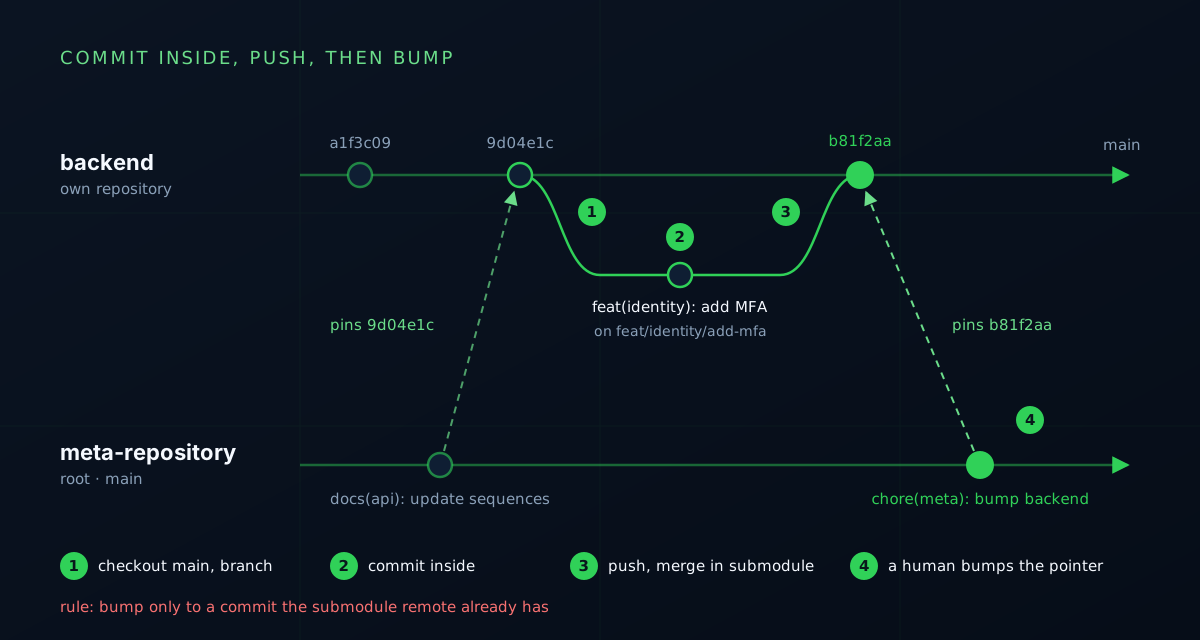
The order matters more than the commands:
# 1. Inside the submodule: get onto a real branch
cd backend
git switch main && git pull
git switch -c feat/auth/logout-endpoint

# 2. Commit inside the submodule
git add -A
git commit -m "feat(auth): add logout endpoint (Closes #43)"

# 3. Push the branch, open a merge request in the backend repository, merge it there
git push -u origin feat/auth/logout-endpoint

# 4. Back at the top level, after the merge: move the pointer and commit it
cd ..
git submodule update --remote backend
git add backend
git commit -m "chore(meta): bump backend"
Step 4 is the lockfile bump. It happens last, on purpose, and it points at a commit that is already merged in the submodule's own repository.
The rule printed on the diagram is the one that prevents the opening error: only bump to a commit the submodule's remote already has. In lockfile terms, never lock a version that was never published to the registry. Your install works because the package is in your cache. Nobody else's does.
How do you stop pushing a pointer to an unpushed commit?
Git can check this for you:
git config push.recurseSubmodules checkWith check, pushing the meta-repo refuses when a gitlink in the pushed commits is not on any remote:
The following submodule paths contain changes that can
not be found on any remote:
  backend
...
fatal: Aborting.
Set it explicitly even if you think the default is safe. When submodule.recurse is true, Git's documentation says an unset push.recurseSubmodules behaves like on-demand. In my scratch repository, a plain git push of the meta-repo printed Pushing submodule 'backend' and pushed straight to the backend's main, past the merge request that step 3 depends on. check refuses and tells you. on-demand decides for you.
Two more settings make bumps reviewable instead of opaque:
git config diff.submodule log           # diffs list the commits between two pointers
git config status.submoduleSummary true # git status summarizes them too
How should branches, commits and bumps be named?
| What | Format | Example |
|---|---|---|
| Branch, in any repo | type/domain/description |
feat/auth/logout-endpoint |
| Commit in a submodule | type(scope): text (Closes #N) |
feat(auth): add logout endpoint (Closes #43) |
| Pointer bump, top level | chore(meta): bump <name> |
chore(meta): bump backend |
| Documentation, top level | docs(area): text |
docs(api): update auth sequences |
The meta scope earns its place quickly. At the time of writing, 33 of the meta-repo's 77 commits are pointer bumps. Without a consistent prefix, the history is a wall of noise. With one, git log --invert-grep --grep='chore(meta)' shows only the commits that changed documentation or structure.
The honest part: ten of those bumps say exactly chore(meta): bump backend and nothing else. The subject line follows the convention and the body tells you nothing. A bump should carry its own changelog, which is one command:
git -C backend log --oneline 9d04e1c..b81f2aa # paste this into the bump commit bodyHow do you close several issues with one merge request?
The convention here is one branch per feature group, not per issue. Login, registration and logout share a schema, configuration and password hashing. Three branches would block each other and duplicate the shared groundwork, so they become one branch with several commits:
git commit -m "chore(auth): scaffold schema and config (Refs #41, Refs #42, Refs #43)"
git commit -m "feat(auth): add login endpoint (Closes #41)"
git commit -m "feat(auth): add registration endpoint (Closes #42)"
git commit -m "feat(auth): add logout endpoint (Closes #43)"
The scaffold commit links all three issues without closing any. Each feature commit closes its own. When the merge request lands on the default branch, GitLab closes all three.
Submodules add two twists.
First, #43 resolves against the project the commit lands in. A commit inside backend closes the backend project's issue 43. If your issues live on the meta-repo's project instead, use a full cross-project reference such as group/project#43.
Second, three different events are easy to mistake for one: the issue closes when the backend merge request merges; the platform as a whole only includes the change after the bump; and neither event proves the change runs anywhere. The project's rules say it bluntly: a submodule commit is a source snapshot, not a release. Verifying agent work goes deeper into keeping those claims apart.
Why do AI agents never commit in this repo?
Agents working in this repository do not stage, commit, push, amend, tag, merge, rebase or switch branches. They write the commit message and the branch name as text; a human runs the command.
That sounds like caution for its own sake until you count what one innocent Git write can do in a meta-repo.
An agent runs git switch inside backend to read an older version of a service. The top level now shows + for that submodule. A later git add -A or git commit -a at the top level stages the moved gitlink along with whatever the agent meant to commit. The meta-repo now pins a commit that might be on a feature branch, or on no remote at all.
Another agent is working in the same checkout. Its backend just changed under it, mid-task, and nothing told it.
An agent runs git push with submodule.recurse on. You saw above where that goes.
In lockfile terms, it is a tool quietly rewriting your lockfile in a change you never asked for. Nobody accepts that from a package manager, and a gitlink deserves the same respect.
What do agents do instead?
They take a snapshot before and after, and compare:
git rev-parse HEAD                 # top-level commit
git diff --cached --name-only      # anything staged? should be empty
git status --porcelain             # dirty paths
git submodule status               # recorded vs checked-out commit per submodule
git -C backend status --porcelain  # dirt inside each submodule
git -C frontend status --porcelain
The project keeps such a baseline as a JSON file: the top-level head and dirty paths, each submodule's indexed and current revision, and explicit flags saying that submodule edits, gitlink edits and staging are not allowed for the task. After the task, any difference that the task did not explain is a finding, not a detail.
Is a rule in a markdown file enough?
No. A rule in a markdown file is advice. While writing this article I checked my own local permission file for the agent and found it allowed git add. Nothing had gone wrong. Nothing would have stopped it either.
Claude Code can make the boundary harder with deny rules, which win over allow rules:
{
  "permissions": {
    "deny": [
      "Bash(git add *)",
      "Bash(git commit *)",
      "Bash(git push *)",
      "Bash(git switch *)",
      "Bash(git checkout *)",
      "Bash(git rebase *)"
    ]
  }
}
Pattern rules leak, though: git -C backend commit does not start with git commit. Treat them as a speed bump, not a wall. The boundary an agent cannot argue its way past is credentials: an environment with no push rights. One rulebook for every agent covers where rules like these should live so that every tool reads the same ones.
What does this workflow cost?
- Two merges for one change. Every backend change is a merge request in the backend repository plus a bump in the meta-repo.
- No atomic cross-repo change. A contract that touches both backend and frontend lands as two merges and a bump. In between, the recorded pair is inconsistent. Inside one monorepo at least the commit is atomic; here not even that is.
- Noisy history. 33 of 77 top-level commits are bumps.
- Every clone and CI job must recurse.
git clone --recurse-submodules, orgit submodule update --init --recursiveafter a plain clone. Forget it and you get empty directories, which fail in confusing ways. - Everyone meets detached HEAD once. The guardrails above make the meeting cheap; they do not prevent it.
When should you not use git submodules?
- The parts always change together. Put them in one monorepo. You get atomic commits and one CI graph.
- You only share a library. Publish a package. Version ranges, changelogs and registries were built for exactly this.
- You want the other code's history merged into yours.
git subtreecopies it in and needs no special clone. - The team will not set the guardrails. Without
checkon push and the branch-first habit, the opening error is a matter of time.
Submodules fit when the repositories really are independent, with their own CI and their own pace, and you still need one place that records "these revisions belong together" and documents that pair.
What would I do differently?
- Ship the Git settings with the repo. A small setup script that sets
push.recurseSubmodules=check,diff.submodule=logandstatus.submoduleSummary=truealongsidesubmodule.recurse=true, instead of relying on everyone's global config. - Check gitlinks in CI. A meta-repo job that fails when a pinned commit is not on the submodule's main branch:
git -C backend merge-base --is-ancestor <pinned> origin/main. - Put the log in every bump. The shortlog between the old and new pointer belongs in the commit body.
- Enforce the agent boundary from day one. Deny rules and push-less credentials, not only a sentence in a rules file.
- Let a bot open the bump. Dependency bots such as Renovate can update submodules, which turns the bump into a reviewed merge request rather than a chore someone forgets.
Key takeaways
- A submodule is a gitlink: mode
160000, one exact commit hash..gitmodulessays where to fetch; the gitlink says what. branch = maindoes not mean "follow main". The meta-repo always pins a commit, like a lockfile.- Switch to a branch inside the submodule before editing. A commit on a detached HEAD is one
git pullaway from being orphaned. - Commit inside, push, merge there, then bump. Never bump to a commit the remote does not have, and set
push.recurseSubmodules=checkso Git refuses for you. - An issue closing, a pointer moving and a service running are three separate facts.
- Agents propose Git commands as text. Back that rule with deny rules and credentials, and verify with a before-and-after snapshot.
The boundary is set: Git stays in human hands. Next comes the rulebook every agent reads, one set of rules files and skills for every tool.
I love this article